
Report an AI response
How the built-in Report response flow inside STALMAS works, supported categories, and automatic secret redaction.
Both local (Gemma 4) and cloud (Gemini BYOK) models can make mistakes or produce unwanted output. STALMAS provides a built-in Report AI Response sheet to help you flag outputs without leaking your credentials.
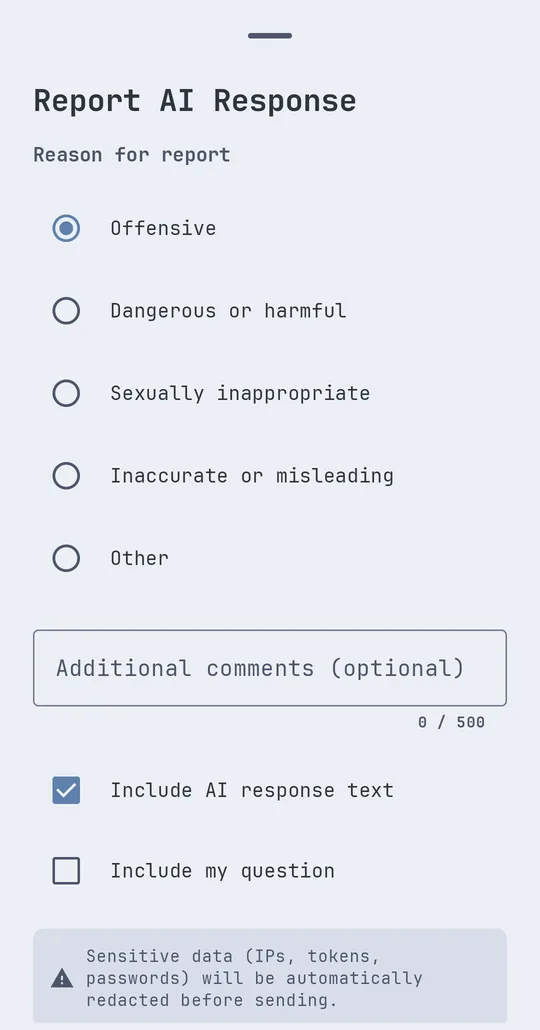
How to report inside the app
- On any assistant message, tap Report response (Report AI Response).
- Choose a Reason for report:
- Offensive
- Dangerous or harmful
- Sexually inappropriate
- Inaccurate or misleading
- Other
- Optionally enter additional notes and toggle Include AI response text and Include my question.
- Tap Send Report to pre-fill a draft in your email app addressed to
report@stalmas.app(or copy the formatted report to your clipboard if no email client is installed).
Automatic redaction before sharing
Before composing the draft or copying it to the clipboard, STALMAS automatically redacts sensitive strings (such as IPs, tokens, and passwords) so server secrets are not shared unintentionally.
Contacting support directly
You can also write to us from the Support & contact page.