
SSH terminal & host key verification (TOFU)
Using STALMAS xterm-256color terminal, .pem/.key private keys, SHA-256 TOFU fingerprints, and Free vs Pro terminal limits.
STALMAS’s SSH terminal pairs JSch transport security with libvterm / ConnectBot termlib (xterm-256color) and a touch-friendly special-key toolbar.
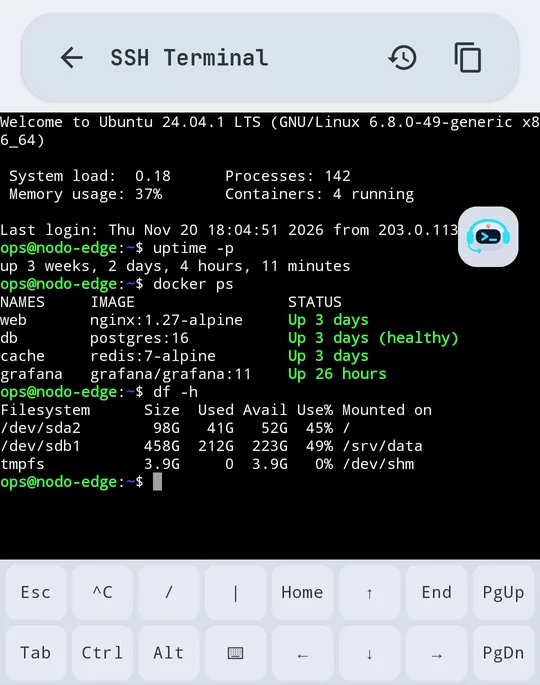
Authentication & containers
- Password authentication or private key (
.pem/.key) imported on device. - Container exec console: open interactive shells (
sh,bash, or a custom command) inside Docker containers managed through Portainer. - Control keys: includes
Esc,Tab,Ctrl, arrow keys, and quick shortcuts designed for mobile screens.
Host key verification (TOFU)
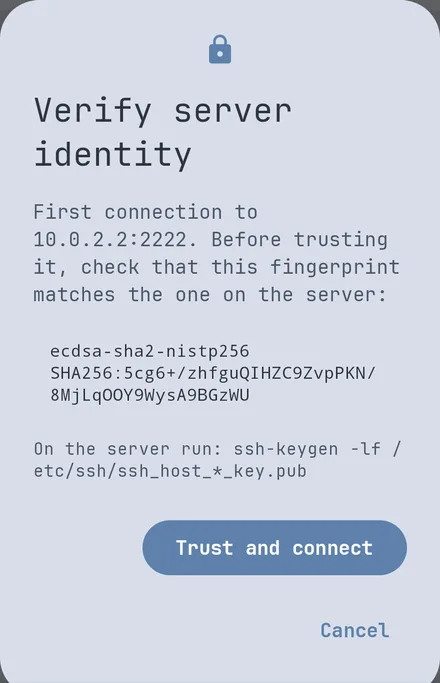
STALMAS enforces persistent Trust On First Use (TOFU) per host and port:
- On first connection, STALMAS displays the host’s cryptographic fingerprint.
- To verify it directly on your server before accepting on your phone, run:
ssh-keygen -lf /etc/ssh/ssh_host_ed25519_key.pub
- If a known host changes its key later (e.g., server rebuild or potential interception), STALMAS stops the connection with a warning until you inspect and confirm.
Dangerous command confirmation
When running commands suggested by the AI assistant, STALMAS checks for destructive patterns (such as rm -rf, docker system prune, or destructive system commands) and requires explicit confirmation before sending them to the shell—even when quick execution is enabled. You can also copy the last command output with one tap.
Free vs Pro terminal limits
| Feature | Free | Pro |
|---|---|---|
| SSH servers | 3 in total, counting Portainer ones | Unlimited |
xterm-256color emulator & copy last output |
Included | Included |
| Command history | Last 50 commands | Up to 500 commands |
| Snippets | Up to 10 | Unlimited with {{name}} variables |
| Key toolbar & cursor pad | Standard row | Customizable row & touch cursor pad |
| Terminal context sent to AI | Up to 4,000 characters | Up to 16,000 characters (cloud) · 1,500 (local) |